







Introduction
Running a successful forex brokerage in 2026 requires much more than providing access to trading platforms like MT4, MT5, or cTrader. While competitive spreads, multiple trading instruments, and reliable execution remain important, the real foundation of a scalable brokerage is efficient operational management.
Behind every successful broker is a powerful system that manages thousands of daily activities, including client registration, KYC verification, deposits, withdrawals, trading account creation, compliance monitoring, partner management, and business reporting.
Many brokerage companies still depend on manual processes, spreadsheets, and disconnected software solutions to manage these operations. Although this approach may work during the early stages of a business, it becomes increasingly difficult as the number of clients, transactions, and regulatory responsibilities grows.
A growing brokerage needs speed, accuracy, automation, and complete visibility. This is where broker backoffice software becomes a critical technology solution.
Modern broker backoffice software acts as the operational engine of a forex brokerage by connecting different departments and processes into one centralized ecosystem. It helps brokers automate repetitive tasks, reduce operational costs, improve compliance, and deliver a better experience for traders.
Whether you are launching a new forex brokerage or expanding an existing operation, investing in the right back-office technology can determine how efficiently your business scales.
Why Most Forex Brokers Struggle With Operations
As brokerages grow, operational complexity increases rapidly. Every new client creates additional responsibilities, including account management, verification, payment processing, reporting, and customer support.

Without a centralized system, many brokerages experience problems such as:
- Slow client onboarding processes
- Delayed KYC approvals
- Manual payment verification
- Difficult withdrawal management
- Incorrect IB commission calculations
- Duplicate client records
- Limited reporting visibility
- Increased compliance risks
- Higher administrative costs
These challenges affect every department inside the brokerage.
Sales teams struggle to access updated client information. Compliance teams spend excessive time reviewing documents. Finance departments manually reconcile transactions. Management teams depend on outdated spreadsheets instead of real-time business data.
As competition increases in the forex industry, operational efficiency has become a major competitive advantage.
The Hidden Cost of Manual Brokerage Operations
Many brokers initially choose manual workflows because they appear affordable. However, as business volume increases, manual processes become expensive and inefficient.
A single client onboarding process may require multiple steps:
- Collecting registration information
- Reviewing personal details
- Verifying identity documents
- Performing AML checks
- Creating trading accounts
- Assigning account settings
- Sending login credentials
- Updating internal records
When every step requires human involvement, delays become unavoidable.
Manual operations also increase the risk of:
- Incorrect client information
- Missing documents
- Payment errors
- Delayed withdrawals
- Compliance failures
- Poor customer experience
In the forex industry, trust is extremely important. A trader who experiences slow verification or delayed withdrawals may quickly move to another broker.
Operational automation helps brokerages provide faster service while maintaining accuracy and compliance.
What Is Broker Backoffice Software?
Broker backoffice software is a centralized operational management platform designed specifically for forex, CFD, cryptocurrency, and multi-asset brokerages.
Unlike trading platforms that focus on executing trades, back-office software manages the internal operations required to run the brokerage successfully.

It connects important business functions including:
- Client management
- KYC and AML verification
- Trading account administration
- Payment processing
- Wallet management
- IB and affiliate management
- Compliance monitoring
- Reporting and analytics
- User permissions
- Audit tracking
Simply put, broker backoffice software is the operational backbone of a modern brokerage.
It allows different departments to work together using the same real-time information instead of relying on separate systems.
Why Broker Backoffice Software Matters
A small brokerage with a limited number of clients may manage operations manually for some time. However, once the business grows, the workload increases significantly.
A growing brokerage may need to handle:
- Hundreds of new registrations daily
- Thousands of transactions monthly
- Multiple payment providers
- Different trading platforms
- Large IB networks
- Regulatory reporting requirements
- Continuous customer support requests
Managing all these activities manually creates unnecessary complexity.
Broker backoffice software solves these challenges by automating workflows and creating a single source of accurate business information.
The result is:
- Faster operations
- Lower costs
- Better compliance
- Improved customer experience
- Easier scalability
1. Client Management System
Client management is one of the most important features of any broker backoffice platform.
The system maintains a complete profile of every trader, including:
- Personal information
- Contact details
- Trading accounts
- Verification status
- Deposit history
- Withdrawal records
- Trading activity
- Support communication
Instead of searching through multiple systems, employees can access everything from one dashboard.
Benefits include:
- Faster customer support
- Better client tracking
- Reduced duplicate records
- Improved customer retention
2. KYC and AML Automation
Compliance is one of the biggest responsibilities for modern forex brokers.
Brokerages must verify customer identities and monitor transactions to prevent fraud and financial crime.
A professional backoffice system automates:
- Identity verification
- Document collection
- AML screening
- Sanctions checking
- Risk assessment
- Compliance records
Clients can upload documents digitally while compliance teams receive automated notifications for review.
This reduces approval times and improves regulatory readiness.
Key advantages:
- Faster onboarding
- Reduced manual work
- Better fraud prevention
- Improved audit preparation
3. Payment and Wallet Management
Financial transactions are at the center of every brokerage operation.
Broker backoffice software helps manage:
- Deposits
- Withdrawals
- Internal transfers
- Wallet balances
- Payment reconciliation
- Multiple currencies
The system can automatically match payments, update balances, and maintain complete transaction records.
This improves:
- Payment accuracy
- Processing speed
- Financial transparency
- Customer satisfaction
4. Trading Platform Integration
Modern brokerages often support multiple trading environments.
A powerful backoffice solution integrates with platforms such as:
- MT4
- MT5
- cTrader
- Proprietary trading platforms
These integrations allow brokers to manage:
- Trading account creation
- Balance synchronization
- Leverage settings
- Trading activity
- Account status
- Client information
This eliminates the need for employees to manually manage each platform separately.
Broker Backoffice Software vs CRM
Many people confuse broker backoffice software with CRM systems. Although both are important, they serve different purposes.
A CRM mainly focuses on:
- Lead generation
- Sales management
- Marketing campaigns
- Client communication
- Follow-ups
Broker backoffice software focuses on:
- Client verification
- Payments
- Trading accounts
- Compliance
- Reporting
- Operational management
A simple way to understand the difference:
CRM helps you acquire clients.
Broker backoffice software helps you manage clients after acquisition.
The most successful brokerages use both systems together to create a complete customer journey.
Broker Backoffice Software vs Trader Room
A Trader Room is a client-facing portal where traders perform actions such as:
- Creating accounts
- Uploading documents
- Depositing funds
- Requesting withdrawals
- Viewing balances

Broker backoffice software is the internal system used by brokerage employees.
For example:
A trader uploads identity documents through the Trader Room.
The compliance department reviews and approves those documents through the backoffice system.
The Trader Room serves the customer.
The backoffice manages the operation behind the customer experience.
Broker Backoffice Software vs Admin Panel
An admin panel usually provides basic management functions such as:
- User management
- Settings control
- Simple reporting
Broker backoffice software provides complete operational control, including:
- Automated workflows
- Compliance management
- Payment processing
- Commission calculation
- Risk monitoring
- Audit logs
- Advanced reporting
An admin panel is only one small part of a complete brokerage ecosystem.
A complete brokerage technology ecosystem works through connected workflows:
Lead generation begins in the CRM.
The client registers through the Trader Room.
Documents are submitted for verification.
Broker backoffice software processes KYC approval.
A trading account is created automatically.
The client deposits funds.
Finance teams monitor transactions.
Risk teams analyze trading activity.
Management views performance through dashboards.
Each system performs a specific role while working together as one connected environment.
Why Modern Brokerages Need Backoffice Software
The forex industry is becoming more competitive every year. Traders expect:
- Fast account approval
- Instant deposits
- Quick withdrawals
- Secure transactions
- Professional customer service

At the same time, regulators require:
- Accurate records
- Strong compliance controls
- Data security
- Transparent reporting
Manual systems cannot efficiently support these demands.
Broker backoffice software provides the automation, visibility, and control required for long-term brokerage growth.
How Broker Backoffice Software Works and Why It Is Essential for Forex Brokerage Growth
A forex brokerage may appear simple from the outside. A trader creates an account, deposits funds, and starts trading. However, behind every successful transaction is a complex network of operational activities involving sales, compliance, finance, risk management, customer support, and technology teams.
Without a centralized system, these processes become fragmented. Different departments may use separate tools for client management, payments, reporting, and compliance. This creates delays, duplicate work, and operational risks.
Broker backoffice software solves this problem by connecting every department through one integrated operational platform.
It works as the central hub that connects:
- CRM systems
- Trader Rooms
- KYC verification providers
- AML monitoring tools
- Payment gateways
- Trading platforms
- Liquidity providers
- Reporting systems
- Risk management solutions
The result is a complete automated workflow where information moves smoothly between departments without unnecessary manual intervention.
Forex Backoffice Workflow Explained
A modern forex brokerage workflow usually follows these stages:
Lead Generation
↓
CRM Management
↓
Client Registration
↓
KYC & AML Verification
↓
Trading Account Creation
↓
Wallet Activation
↓
Deposit Processing
↓
Trading Activity
↓
Risk Monitoring
↓
IB Commission Calculation
↓
Withdrawal Processing
↓
Compliance Monitoring
↓
Reports & Analytics Dashboard
Each stage plays an important role in creating an efficient brokerage operation.
Step 1: Lead Generation and CRM Integration
Every brokerage starts by attracting potential traders through:
- Digital marketing campaigns
- SEO
- Paid advertising
- Affiliate partnerships
- Introducing Brokers
- Social media marketing
When a potential customer submits their information, the data enters the CRM system.
Typical information collected includes:
- Name
- Email address
- Phone number
- Country
- Marketing source
- Trading preferences
The CRM allows sales teams to manage follow-ups, track conversions, and improve customer acquisition.
Once the lead becomes a registered client, the information automatically transfers into the broker backoffice system.
This eliminates duplicate data entry and improves operational accuracy.
After registration, broker backoffice software manages the complete client onboarding process.
The system can automatically:
- Create client profiles
- Assign customer IDs
- Generate account records
- Manage onboarding status
- Trigger verification workflows
Automation reduces the time required to activate new traders and creates a smoother customer experience.
A faster onboarding process improves conversion rates because traders are less likely to abandon registration due to delays.
Step 2: KYC and AML Verification Process
Compliance is one of the most important responsibilities of any forex brokerage.
Before allowing trading activities, brokers must verify client identities and assess potential risks.
Broker backoffice software manages:
- Identity document collection
- Passport verification
- National ID checks
- Proof of address
- Face verification
- AML screening
- Sanctions checks
The system stores all compliance information securely and creates an audit trail.
Compliance officers can quickly review client information and focus on higher-risk cases instead of manually checking every application.
Benefits include:
- Faster verification
- Reduced fraud risk
- Improved regulatory compliance
- Better audit preparation
After successful verification, the broker backoffice system can automatically create trading accounts.
Instead of manually configuring every account, the platform can:
- Create MT4 accounts
- Create MT5 accounts
- Connect cTrader accounts
- Assign account types
- Configure leverage
- Set currencies
- Generate login credentials
This allows clients to start trading faster while reducing operational workload.
Step 3: Trading Platform Integration
A modern brokerage may support several trading platforms.
Broker backoffice software integrates with:
- MetaTrader 4
- MetaTrader 5
- cTrader
- Proprietary trading platforms
The integration synchronizes:
- Account balances
- Trading activity
- Open positions
- Equity
- Margin levels
- Trading history
- Leverage settings
Step 4: Deposit and Wallet Management
Deposits are a critical part of brokerage operations.
Clients may use different payment methods, including:
- Bank transfers
- Credit cards
- E-wallets
- Cryptocurrency payments
- Local payment providers
Broker backoffice software automates the entire payment workflow.
The system can:
- Detect incoming payments
- Match transactions with client accounts
- Update wallet balances
- Notify relevant teams
- Record payment history
- Identify suspicious transactions
This improves payment speed and reduces financial errors.
Risk management is essential for brokerage stability.
Without proper monitoring, brokers may face problems such as:
- Excessive client exposure
- Negative balances
- High-risk trading activity
- Unusual withdrawal patterns
- Margin issues
Modern broker backoffice software provides real-time monitoring of:
- Open positions
- Margin levels
- Trading volume
- Account exposure
- Client behavior
Risk managers receive alerts when unusual activity occurs.
This allows the brokerage to respond quickly before problems become serious.
Withdrawals directly impact client trust.
Slow withdrawal processing is one of the biggest reasons traders leave brokers.
Backoffice software helps finance teams manage withdrawals through:
- Automated approval workflows
- Compliance checks
- Transaction verification
- Payment tracking
- Historical records
Benefits:
- Faster processing
- Reduced errors
- Better customer satisfaction
- Improved financial control
Step 5: Compliance and Audit Management
Regulatory requirements continue to increase worldwide.
Brokerages must maintain detailed records of:
- Client activities
- Account changes
- Payments
- Verification decisions
- Administrative actions
Broker backoffice software automatically creates audit logs that record every important action.
This helps compliance teams:
- Prepare reports faster
- Respond to audits
- Maintain transparency
- Reduce regulatory risk
Broker Dashboard: The Command Center of Brokerage Operations
One of the most powerful features of broker backoffice software is the broker dashboard.
A dashboard provides executives and managers with real-time visibility into the entire business.
Instead of checking multiple systems, management can monitor everything from one place.
A modern broker dashboard displays:
- Active clients
- New registrations
- Trading volume
- Deposits
- Withdrawals
- Revenue
- Compliance cases
- Risk alerts
- IB performance
- Support activity
Client Analytics
Managers can monitor:
- Total clients
- Active traders
- Verified users
- New registrations
- Client locations
- Retention rates
This helps identify growth opportunities.
Financial Performance
The dashboard tracks:
- Daily revenue
- Deposit volume
- Withdrawal volume
- Commission payments
- Trading income
- Profitability
Real-time financial visibility helps improve decision-making.
Trading Activity Monitoring
Brokerages can analyze:
- Trading volume
- Popular instruments
- Open positions
- Margin usage
- Client exposure
This supports better risk management.
The system highlights:
- Pending KYC reviews
- Expired documents
- AML warnings
- Suspicious transactions
- High-risk clients
This allows compliance teams to act quickly.
Introducing Broker (IB) and Affiliate Management
Introducing Brokers and affiliates are important growth channels for many forex companies.
However, managing large partner networks manually can become complicated.
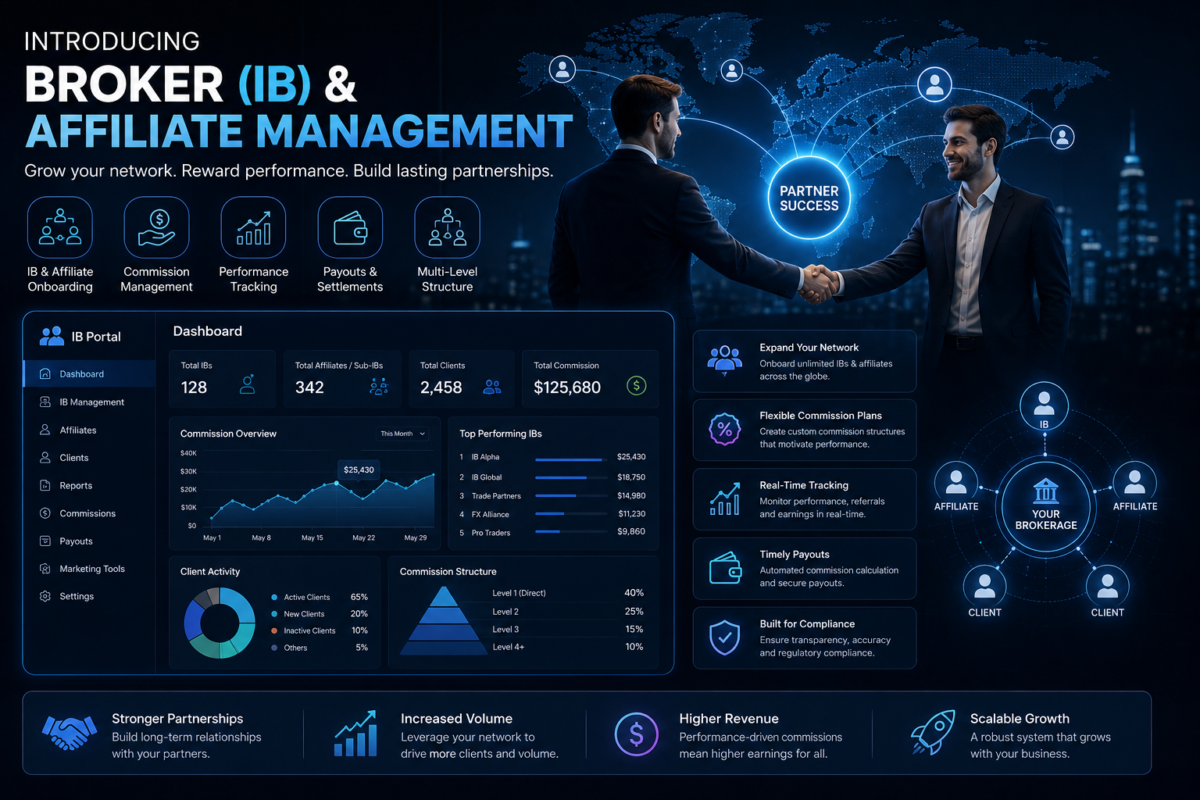
Broker backoffice software automates:
- Referral tracking
- Partner registration
- Commission calculation
- Revenue sharing
- Performance reports
The system can support different commission models:
- CPA
- Revenue sharing
- Spread rebates
- Hybrid models
- Multi-level commissions
Benefits:
- Accurate calculations
- Faster payments
- Greater transparency
- Better partner relationships
Reporting and Business Intelligence
Successful brokerages rely on accurate data.
Broker backoffice software provides detailed reports covering:
- Client growth
- Trading volume
- Revenue
- Deposits
- Withdrawals
- Compliance status
- IB commissions
- Operational performance
Reports help management understand what is working and where improvements are needed.
Security and Access Control
Brokerages handle sensitive financial and personal information.
A professional backoffice system includes security features such as:
- Role-based permissions
- User activity tracking
- Audit logs
- Data encryption
- Secure document storage
Different departments can access only the information they need.
For example:
Finance teams manage payments.
Compliance teams review verification records.
Sales teams manage client relationships.
Executives view overall business performance.
Why Broker Backoffice Software Is a Strategic Investment
Broker backoffice software is no longer just an administrative tool. It has become a core technology requirement for modern brokerages.
It helps businesses:
- Reduce operational costs
- Improve efficiency
- Automate repetitive tasks
- Strengthen compliance
- Deliver faster customer service
- Scale globally
For startups, it creates a strong operational foundation.
For established brokers, it provides the scalability required for expansion.
Conclusion
The success of a forex brokerage depends on more than trading technology. A powerful operational infrastructure is essential for managing clients, payments, compliance, risk, and business growth.
Broker backoffice software provides the centralized environment needed to run a modern brokerage efficiently.
By connecting CRM systems, Trader Rooms, trading platforms, payment providers, compliance tools, and analytics dashboards, it creates a complete ecosystem where every department works together.
As competition in the forex industry continues to increase, brokerages that invest in automation and operational intelligence will have a significant advantage.
The future of brokerage success belongs to companies that can operate faster, smarter, and more efficiently through advanced back-office technology.
Complete Forex Backoffice Workflow Explained
Step 1: Lead Generation
Every client journey starts with lead generation.
Potential traders discover a brokerage through:
- Digital marketing campaigns
- Search engines
- Social media
- Webinars
- Affiliate partners
- Introducing Brokers (IBs)
When visitors submit registration forms, their information is automatically captured and transferred to the CRM system.
This ensures that every potential client is tracked and allows sales teams to begin relationship-building immediately.
Step 2: CRM and Lead Management
The Forex CRM manages the early customer journey by organizing leads and tracking their movement through the sales funnel.
Sales teams can:
- Assign leads to account managers
- Schedule follow-up activities
- Send automated emails
- Track conversations
- Monitor conversion rates
When a lead becomes an active client, the CRM transfers information to the broker backoffice software automatically.
This removes duplicate data entry and creates a smoother transition from sales to operations.
After deciding to open an account, the client completes registration through the Trader Room or client portal.
The system collects important information such as:
- Personal details
- Contact information
- Country of residence
- Trading preferences
- Account type
- Base currency
- Trading experience
Broker backoffice software validates the information and prepares the client profile for compliance verification.
Step 3: KYC and AML Verification
Compliance is one of the most important stages of brokerage operations.
Clients submit documents including:
- Passport
- National ID
- Proof of address
- Verification images
The backoffice system integrates with KYC and AML providers to automate:
- Identity verification
- Document authentication
- Face matching
- Sanctions screening
- PEP checks
- AML monitoring
Low-risk applications can be approved quickly, while suspicious cases are automatically flagged for manual review.
Benefits include:
- Faster onboarding
- Reduced fraud risk
- Improved regulatory compliance
- Better audit preparation
Step 4: Account Approval
After successful verification, the compliance team approves the account.
The broker backoffice software automatically:
- Activates the client profile
- Assigns permissions
- Configures leverage
- Creates wallet connections
- Enables trading access
Automation significantly reduces account activation time and improves customer experience.
Step 5: MT4, MT5, and cTrader Account Creation
After approval, the backoffice system communicates with the selected trading platform to create a live trading account.
The integration manages:
- Trading account creation
- Login generation
- Balance synchronization
- Leverage configuration
- Trading permissions
- Account monitoring
Clients receive account credentials quickly without requiring manual intervention from operations teams.
Before trading, clients need secure wallet management.
Broker backoffice software creates wallets where traders can:
- Deposit funds
- Hold multiple currencies
- Transfer money between accounts
- Move funds to trading accounts
- Request withdrawals
Multi-wallet functionality improves flexibility for traders and simplifies financial operations for brokers.
Step 6: Deposit Processing
Clients can fund accounts through:
- Bank transfers
- Credit cards
- E-wallets
- Cryptocurrency payments
- Local payment providers
The backoffice system automatically:
- Verifies payments
- Updates wallet balances
- Records transactions
- Tracks payment status
Finance teams can monitor deposits through real-time dashboards.
This improves:
- Payment speed
- Financial accuracy
- Client satisfaction
Step 7: Trading Activity Monitoring
Once funded, clients begin trading.
Broker backoffice software continuously synchronizes information from trading platforms, including:
- Open positions
- Closed trades
- Profit and loss
- Margin usage
- Equity
- Trading volume
- Account balance
Real-time synchronization ensures that every department has access to accurate information.
Step 8: Risk Monitoring
Risk management operates continuously in the background.
The system monitors:
- Margin levels
- Negative balances
- Large positions
- Trading patterns
- Liquidity exposure
- High-risk accounts
- Market volatility
When unusual activity occurs, automated alerts notify risk teams.
This allows brokers to respond quickly and reduce financial exposure.
Step 9: IB and Affiliate Commission Management
Introducing Brokers and affiliates are important acquisition channels for many brokerages.
Managing commissions manually becomes difficult as partner networks grow.
Broker backoffice software automatically:
- Tracks referrals
- Records trading activity
- Calculates commissions
- Generates reports
- Processes payouts
Supported models may include:
- CPA commissions
- Revenue sharing
- Spread rebates
- Hybrid models
Automation improves accuracy and strengthens partner relationships.
Step 10: Withdrawal Processing
Withdrawals directly influence client trust.
The backoffice system manages withdrawal requests through:
- Balance verification
- Compliance checks
- Fraud detection
- Approval workflows
- Transaction recording
Fast and transparent withdrawal processing improves customer retention.
Step 11: Compliance Monitoring
Compliance continues after account approval.
The system continuously monitors:
- Suspicious transactions
- AML alerts
- Expired documents
- Sanctions updates
- Regulatory requirements
- High-risk accounts
Every action is stored in secure audit logs, making future inspections easier.
Step 12: Reporting and Business Analytics
Brokerages generate large amounts of operational data every day.
Broker backoffice software converts this data into useful reports covering:
- Revenue
- Trading volume
- Client growth
- Deposit trends
- Withdrawal activity
- Partner performance
- Compliance status
These insights help executives make faster and better business decisions.
Step 13: Broker Dashboard
The broker dashboard provides a complete real-time overview of brokerage performance.
It displays:
- Active clients
- New registrations
- Deposits
- Withdrawals
- Trading volume
- Revenue
- Open positions
- Risk exposure
- IB commissions
- Compliance alerts
Instead of waiting for manual reports, management can instantly understand the health of the brokerage.
Why Integrated Forex Backoffice Workflow Matters
A brokerage cannot operate efficiently when every department uses separate systems.
Disconnected workflows create:
- Duplicate data
- Slow processes
- Reporting errors
- Compliance risks
- Higher operational costs
Broker backoffice software solves these challenges by connecting every function into one centralized platform.
From client acquisition and onboarding to payments, trading, compliance, and analytics, every department works with the same accurate information.
The result is:
- Faster operations
- Lower costs
- Better compliance
- Improved customer experience
- Easier scalability
For modern forex brokerages, an integrated backoffice workflow is no longer optional. It is the foundation for sustainable growth.
Complete Forex Broker Backoffice Workflow: From Lead Generation to Trading Operations

A successful forex brokerage requires more than a powerful trading platform. Behind every professional brokerage is a sophisticated operational system that manages client onboarding, compliance, payments, trading accounts, risk monitoring, reporting, and daily business activities.
Modern Broker Backoffice Software acts as the central operating system of a brokerage, connecting every department and automating critical workflows. From the moment a potential trader visits the website until they become an active client, every process can be managed through one integrated platform.
1. Lead Generation and Client Acquisition
Every trader journey begins with lead generation.
Potential clients discover a brokerage through:
- Digital marketing campaigns
- Search engines
- Social media
- Affiliate partnerships
- Introducing Brokers (IBs)
- Webinars
- Landing pages
When a visitor submits a registration form, their information is automatically captured by the brokerage system and transferred into the Forex CRM.
This ensures:
- No leads are lost
- Sales teams can respond quickly
- Customer journeys can be tracked
- Marketing performance can be measured
A connected CRM and back-office ecosystem allows brokerages to move prospects smoothly from the first interaction to account activation.
2. CRM and Lead Management
A Forex CRM focuses on customer acquisition and relationship management.
Sales teams can use CRM features to:
- Assign leads to account managers
- Schedule follow-up activities
- Send automated emails
- Track conversations
- Monitor sales performance
- Analyze conversion rates
Once a prospect decides to become a trader, their information automatically moves from the CRM into the Broker Backoffice Software.
This eliminates:
- Duplicate data entry
- Manual paperwork
- Communication gaps
- Operational delays
The CRM helps acquire clients, while the back-office system manages them after registration.
The client registration process is one of the most important stages of the brokerage journey.
Through the Trader Room or client portal, users provide:
- Personal information
- Contact details
- Country of residence
- Preferred account type
- Base currency
- Trading experience
The broker back-office platform automatically stores this information and prepares the account for compliance verification.
A smooth registration experience improves conversion rates because traders expect fast and simple onboarding.
3. KYC and AML Compliance Automation
Compliance is a critical requirement for every professional brokerage.
Manual verification processes can slow down onboarding and increase operational costs.
Modern Broker Backoffice Software integrates with KYC and AML providers to automate:
- Identity verification
- Document authentication
- Face recognition
- Address verification
- Sanctions screening
- Politically Exposed Person (PEP) checks
- Anti-Money Laundering monitoring
Low-risk applications can be approved automatically, while suspicious cases are sent to compliance teams for manual review.
This creates a faster onboarding process while maintaining regulatory standards.
4. Account Approval and Trading Access
After successful verification, the system automatically activates the client profile.
The platform can:
- Create customer accounts
- Assign permissions
- Configure leverage settings
- Create wallets
- Enable trading access
Automation reduces waiting times and allows traders to start using brokerage services faster.
For growing brokerages, reducing onboarding delays directly improves customer satisfaction and revenue opportunities.
5. MT4, MT5 and cTrader Account Integration
Trading platform integration is one of the most important features of modern broker back-office software.
The system connects with popular platforms including:
- MT4
- MT5
- cTrader
- DXtrade
Through integration, brokerages can automate:
- Trading account creation
- Login generation
- Balance synchronization
- Leverage management
- Trading permissions
- Account monitoring
Without integration, operations teams must manually create accounts and update information across multiple systems.
Automation improves accuracy and saves significant operational time.
6. Wallet Management and Fund Operations
A professional brokerage needs an efficient financial management system.
Broker Backoffice Software provides wallet functionality where clients can:
- Deposit funds
- Hold multiple currencies
- Transfer money between accounts
- Move funds into trading accounts
- Request withdrawals
Multi-wallet functionality gives traders more flexibility while allowing brokerages to manage financial operations from one centralized system.
7. Deposit Processing and Payment Automation
Deposits are one of the most important parts of the trading experience.
Modern brokerages support multiple payment methods, including:
- Bank transfers
- Credit cards
- E-wallets
- Cryptocurrency payments
- Local payment gateways
The back-office platform automatically:
- Confirms transactions
- Updates wallet balances
- Records payment history
- Generates financial reports
Real-time payment visibility helps finance teams manage cash flow more efficiently.
8. Trading Activity Monitoring
Once clients begin trading, the back-office system continuously synchronizes information from trading platforms.
Management can monitor:
- Open positions
- Closed trades
- Profit and loss
- Trading volume
- Margin usage
- Equity
- Account balance
This provides complete visibility into brokerage activity and helps teams make faster decisions.
9. Risk Management and Monitoring
Risk management is essential for protecting brokerage operations.
Broker Backoffice Software continuously monitors:
- Margin levels
- Large positions
- Negative balances
- Unusual trading activity
- Liquidity exposure
- High-risk accounts
Automated alerts notify risk teams when unusual situations occur.
This allows brokerages to respond quickly before small issues become major financial problems.
10. IB and Affiliate Commission Management
Many forex brokerages depend on Introducing Brokers and affiliate partners for client acquisition.
Managing hundreds of partners manually becomes difficult.
Back-office automation helps with:
- Referral tracking
- Trading activity monitoring
- Commission calculation
- Partner reporting
- Automated payouts
This improves transparency and strengthens relationships with partners.
11. Withdrawal Processing
Withdrawals directly impact customer trust.
A slow withdrawal process can damage a brokerage’s reputation.
Broker Backoffice Software automates:
- Withdrawal requests
- Balance verification
- Compliance checks
- Fraud detection
- Approval workflows
- Payment records
A faster withdrawal experience creates greater confidence among traders.
12. Compliance Monitoring After Registration
Compliance does not stop after account approval.
A professional brokerage must continuously monitor client activity.
The system tracks:
- Suspicious transactions
- AML alerts
- Expired documents
- Regulatory requirements
- High-risk activities
Complete audit trails make regulatory inspections easier and improve operational transparency.
13. Reporting and Business Analytics
Data is one of the most valuable assets of a brokerage.
Modern platforms provide reports covering:
- Revenue
- Client growth
- Trading volume
- Deposits
- Withdrawals
- Partner performance
- Compliance statistics
- Operational efficiency
Executives can use these insights to improve business strategy and identify growth opportunities.
14. Broker Dashboard: Complete Business Visibility
The broker dashboard provides a complete overview of brokerage performance.
Typical dashboard metrics include:
- Active clients
- New registrations
- Deposits
- Withdrawals
- Revenue
- Trading volume
- Open positions
- Risk exposure
- IB commissions
- Compliance alerts
Instead of waiting for manual reports, management gets real-time visibility into business performance.
A disconnected brokerage environment creates problems:
- Duplicate data entry
- Manual reporting
- Slow onboarding
- Payment errors
- Compliance risks
- Poor customer experience
An integrated Forex Back Office Software solution connects every department through one centralized platform.
This enables:
- Faster operations
- Lower costs
- Better compliance
- Improved customer experience
- Easier scalability
For modern brokerages, automation is no longer optional. It is a foundation for sustainable growth.
How to Choose the Right Broker Backoffice Software: Complete Evaluation Guide (2026)
Running a successful forex brokerage requires much more than providing a trading platform. Behind every profitable and scalable brokerage is a powerful operational system that manages clients, compliance, payments, reporting, integrations, and daily business activities.
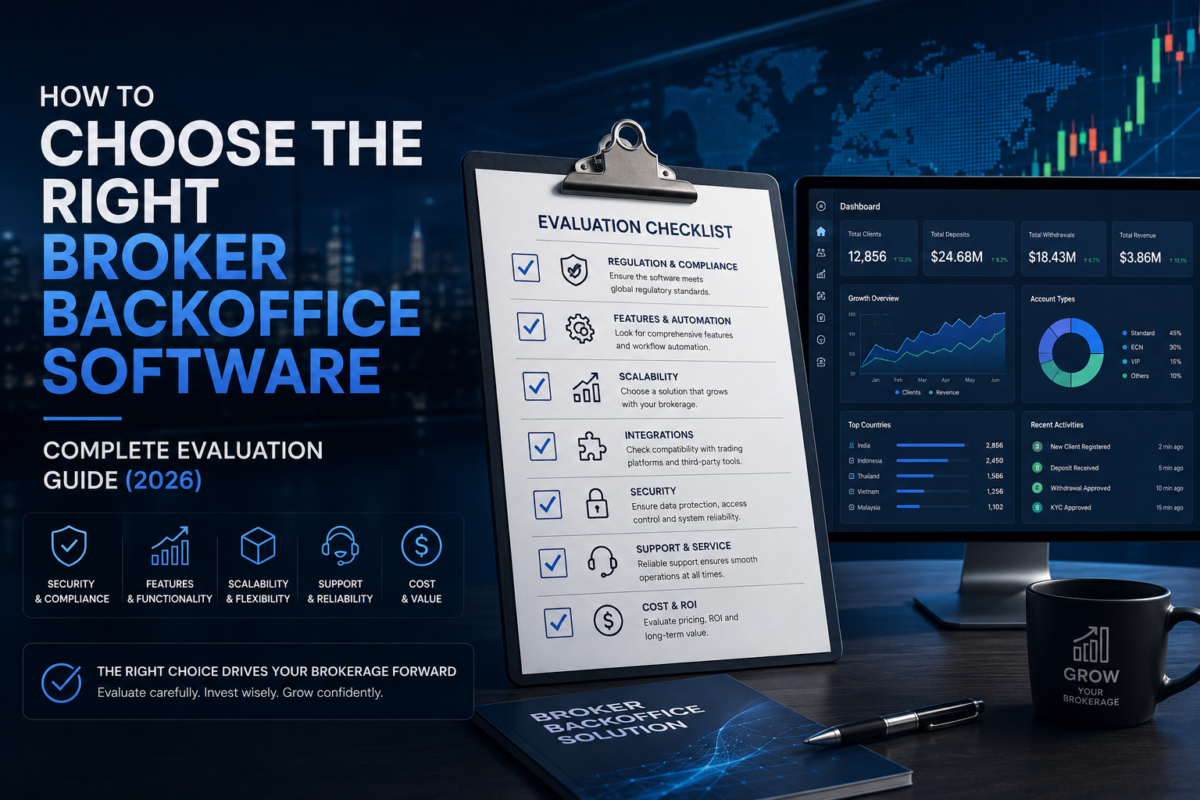
This is where Broker Backoffice Software becomes essential.
A modern broker back-office platform acts as the operational foundation of a brokerage by connecting multiple departments and systems into one centralized environment. It helps brokers automate manual tasks, improve efficiency, reduce operational risks, and deliver a better experience to traders and partners.
However, choosing the right solution is not easy. Many providers offer similar features, but the difference lies in scalability, security, integrations, customization, support, and long-term value.
This guide explains the most important factors to consider before investing in broker backoffice software.
1. Can the Software Scale With Your Brokerage?
A brokerage may start with a small number of clients, but successful businesses eventually expand into thousands of traders, multiple regions, and different brands.
The software you choose today should support your future growth without requiring a complete technology replacement.
Before selecting a provider, ask:
- How many active clients can the platform handle?
- Can it support multiple brokerage brands?
- Does it support multiple offices and teams?
- Can it manage increasing trading volumes?
- Is the architecture designed for enterprise-level growth?
A scalable broker management system should provide:
- High-performance infrastructure
- Multi-brand capability
- Multi-region support
- Multi-language functionality
- Multi-currency support
- High availability
Choosing a scalable platform reduces future migration costs and allows your brokerage to grow without operational disruption.
Deployment flexibility is another important consideration when choosing forex brokerage software.
Cloud Deployment
Cloud-based broker backoffice solutions are hosted by the software provider.
Benefits:
- Faster implementation
- Lower infrastructure costs
- Automatic updates
- Easy scalability
- Remote accessibility
- Better disaster recovery
Cloud solutions are becoming increasingly popular because they allow brokerages to expand globally without maintaining expensive server infrastructure.
On-Premise Deployment
On-premise software is installed on your own servers.
Benefits:
- Greater infrastructure control
- Custom security policies
- Internal server management
- Specific hosting environments
Some businesses prefer this model because of regulatory or internal IT requirements.
Hybrid Deployment
Hybrid solutions combine cloud flexibility with internal infrastructure control.
The right deployment model depends on your brokerage size, compliance requirements, budget, and operational strategy.
2. Does It Provide Open APIs and Integrations?
Modern brokerages depend on multiple technologies working together.
A broker backoffice platform should not operate as an isolated system. It should integrate smoothly with your existing technology ecosystem.
Important integrations include:
- MetaTrader 4 (MT4)
- MetaTrader 5 (MT5)
- cTrader
- DXtrade
- Payment gateways
- KYC providers
- CRM platforms
- Email services
- SMS providers
- WhatsApp Business
- Liquidity providers
- Accounting software
Open APIs and webhooks make future integrations easier and reduce development costs.
Before purchasing, ask:
- Is the API fully documented?
- Are webhooks available?
- Does it support real-time synchronization?
- Are there API limitations?
A strong API foundation ensures your brokerage can adopt new technologies in the future.
3. How Flexible Is Customization?
Every brokerage has different workflows, business models, and operational requirements.
The best broker backoffice software should adapt to your processes rather than forcing your team to change everything.
Customization options may include:
- Custom dashboards
- User permissions
- Client registration forms
- Workflow automation
- Branding options
- Reports
- Commission structures
- Notification templates
For example, a brokerage operating in multiple countries may require different onboarding workflows, payment methods, and compliance procedures.
Flexible software allows businesses to create processes that match their exact needs.
Brokerage operations continue even when managers are away from their desks.
Modern platforms should provide secure mobile access so teams can monitor important activities anytime.
Mobile capabilities may include:
- Dashboard monitoring
- Report viewing
- Withdrawal approvals
- Compliance alerts
- Performance tracking
Mobile accessibility improves decision-making speed and allows management teams to respond quickly to important situations.
4. White Label Support for Brokerage Growth
White label functionality is extremely important for companies planning to launch multiple brands or expand their services.
A strong white-label broker solution should allow customization of:
- Company logo
- Domain name
- Color themes
- Client portal
- Login pages
- Email templates
- Mobile applications
This creates a consistent brand experience and helps businesses build trust with traders.
White-label capabilities are especially valuable for brokerage groups managing multiple trading brands under one technology infrastructure.
5. Advanced Reporting and Analytics
Data-driven decisions are critical in financial businesses.
A professional broker backoffice platform should provide real-time visibility into business performance.
Important reports include:
- Client growth reports
- Revenue analysis
- Trading volume reports
- Deposit and withdrawal reports
- IB commission reports
- Compliance reports
- Risk monitoring reports
- Executive summaries
Advanced reporting features should include:
- Real-time dashboards
- Data filtering
- Scheduled reports
- Export options
- Department-specific views
Without strong analytics, management teams are forced to depend on spreadsheets and manual calculations.
6. Enterprise-Level Security Features
Security should be one of the highest priorities when selecting brokerage software.
Forex brokers manage sensitive information including:
- Personal client data
- Financial transactions
- Trading records
- Compliance documents
A secure broker backoffice system should include:
- Data encryption
- Two-factor authentication (2FA)
- Role-based access control (RBAC)
- Audit logs
- Automated backups
- Disaster recovery
- Secure APIs
- Privacy controls
Security protects your brokerage from cyber threats, fraud, and regulatory problems.
Even the best software requires technical support.
Before selecting a provider, evaluate:
- 24/7 support availability
- Live chat support
- Email assistance
- Dedicated account managers
- Training sessions
- Documentation
- Knowledge base
- Service Level Agreement (SLA)
A reliable vendor helps reduce downtime and ensures smooth implementation.
The quality of customer support often becomes more important as your brokerage grows.
7. Transparent Pricing Structure
Pricing should not be evaluated only by monthly subscription fees.
A cheaper solution may become expensive later if it lacks important features.
Consider:
- Setup fees
- Monthly costs
- API charges
- Additional user fees
- Support costs
- Upgrade expenses
- Customization charges
The best approach is evaluating the total cost of ownership (TCO).
A slightly higher investment in a scalable and reliable platform can save significant costs in the long term.
Common Mistakes When Choosing Broker Backoffice Software
1. Selecting Only Based on Price
Many brokerages choose the cheapest option without considering scalability, security, or future requirements.
Low-cost software may lack:
- Automation
- Reporting
- Integrations
- Security features
- Reliable support
Always evaluate long-term value instead of only initial cost.
2. Ignoring API Capabilities
Without proper APIs, connecting new platforms and services becomes difficult.
A modern brokerage needs flexibility to integrate new technologies as the business evolves.
Choose software with:
- REST APIs
- Webhooks
- Documentation
- Real-time synchronization
3. Overlooking Reporting Features
Poor reporting creates problems with:
- Revenue tracking
- Client analysis
- Compliance monitoring
- Business forecasting
A strong reporting system helps management make faster and better decisions.
4. Ignoring Security Requirements
Weak security can expose brokerages to:
- Data breaches
- Fraud
- Compliance violations
Never compromise on security features.
5. Not Testing Before Purchase
Always request:
- Live demonstrations
- Trial access
- Product walkthroughs
Testing helps evaluate usability, workflows, and overall efficiency.
Future Trends in Broker Backoffice Software
The future of brokerage technology will be shaped by automation, artificial intelligence, and connected financial ecosystems.
Artificial Intelligence in Brokerage Operations
AI will transform broker backoffice platforms through:
- Automated KYC verification
- Fraud detection
- Risk analysis
- Predictive client behavior
- AI support assistants
- Compliance automation
AI will help brokers reduce manual work and make smarter business decisions.
Cloud-Native Brokerage Platforms
Cloud technology will become the standard because it provides:
- Faster deployment
- Better scalability
- Global accessibility
- Lower infrastructure costs
Cloud-native platforms will allow brokerages to expand internationally with greater flexibility.
Predictive Analytics and Smart Reporting
Future systems will move beyond traditional reports.
AI-powered analytics will help predict:
- Client churn
- Revenue trends
- Trading activity
- Deposit behavior
- Marketing performance
This will allow brokerages to act before problems occur.
End-to-End Workflow Automation
Future broker management systems will automate complete workflows:
- Lead qualification
- Client onboarding
- KYC approval
- Account creation
- Payment processing
- Commission calculation
- Compliance reporting
Automation will improve speed, accuracy, and operational efficiency.
Frequently Asked Questions (FAQs)
What is broker backoffice software?
Broker backoffice software is a centralized platform that helps forex brokers manage operations including client onboarding, payments, compliance, reporting, trading accounts, and administration.
How is broker backoffice software different from Forex CRM?
A Forex CRM focuses mainly on sales, leads, and customer relationships.
Broker backoffice software manages operational activities such as:
- Compliance
- Payments
- Reporting
- Account management
- Risk monitoring
Many brokerages use both systems together.
Does broker backoffice software support MT4 and MT5?
Yes. Most advanced solutions integrate with MT4 and MT5 for account management, trading synchronization, and reporting.
Can it support multiple trading platforms?
Yes. Modern platforms can support:
- MT4
- MT5
- cTrader
- DXtrade
This allows brokers to manage multiple environments from one system.
Can it automate KYC and compliance?
Yes. Modern systems can integrate identity verification, AML screening, document checks, and compliance workflows.
How much does broker backoffice software cost?
Pricing depends on:
- Features
- Integrations
- Number of users
- Customization
- Deployment model
Most providers offer customized pricing based on brokerage requirements.
1. Trader Room
Where to Link
Mention it during:
- Client Portal
- Account Opening
- Deposits
- Withdrawals
- User Dashboard
Natural Anchor Text Examples
- Trader Room
- Client Portal
- Forex Trader Room
- secure client portal
- trader dashboard
Suggested Sentence
Most brokerages combine their back-office platform with a secure Trader Room, allowing clients to manage accounts, upload KYC documents, make deposits, request withdrawals, and monitor trading activity from a single interface.
2. MT5 CRM
Where to Link
Inside:
- MT5 Integration
- Trading Platforms
- CRM Integration
Natural Anchor Text Examples
- MT5 CRM
- MetaTrader 5 CRM
- CRM for MT5 brokers
- MT5 brokerage software
Suggested Sentence
If your brokerage primarily operates on MetaTrader 5, integrating an MT5 CRM with your broker backoffice software provides a seamless connection between sales, client management, and trading operations.
3. Liquidity Bridge
Where to Link
During discussions about:
- Liquidity Providers
- Trade Execution
- Risk Management
- Multi-LP Environment
Natural Anchor Text Examples
- Liquidity Bridge
- Forex Liquidity Bridge
- bridge technology
- liquidity management solution
Suggested Sentence
A Liquidity Bridge connects trading platforms with liquidity providers, helping brokerages achieve efficient order routing, competitive pricing, and reliable trade execution.
4. Forex White Label
Where to Link
Within:
- Startup Brokerages
- Launching a Brokerage
- White Label Support
- Scalability
Natural Anchor Text Examples
- Forex White Label
- White Label Brokerage
- White Label Trading Platform
- brokerage launch solution
Suggested Sentence
Startups often combine Forex White Label solutions with broker backoffice software to launch a fully operational brokerage without developing technology from scratch.
5. Payment Gateway
Where to Link
During:
- Deposits
- Withdrawals
- Payment Management
- Financial Operations
Natural Anchor Text Examples
- Forex Payment Gateway
- payment gateway integration
- brokerage payment solution
- online payment processing
Suggested Sentence
Integrating a reliable Payment Gateway enables brokerages to automate deposits, withdrawals, transaction reconciliation, and multi-currency payment processing.
6. PAMM
Where to Link
Within:
- Investment Products
- Managed Accounts
- Multi-Account Trading
Natural Anchor Text Examples
- PAMM
- PAMM software
- managed accounts
- Percentage Allocation Management Module
Suggested Sentence
Brokerages offering managed investment services often integrate PAMM solutions with their broker backoffice software to automate investor allocation, reporting, and profit distribution.
7. Copy Trading
Where to Link
Inside:
- Trading Solutions
- Client Experience
- Trading Services
Natural Anchor Text Examples
- Copy Trading
- social trading
- trade copying platform
- copy trading software
Suggested Sentence
Copy Trading enables investors to automatically replicate the trades of experienced traders, while the back-office platform manages client accounts, reporting, and payment workflows.
8. Introducing Broker (IB) Management
Where to Link
Within:
- Commission Engine
- Affiliate Tracking
- Partner Management
Natural Anchor Text Examples
- IB Management
- Introducing Broker Management
- IB Portal
- affiliate management software
Suggested Sentence
An advanced IB Management system automates referral tracking, commission calculations, partner reporting, and payout management for Introducing Brokers.
9. Forex Risk Management
Where to Link
Inside:
- Risk Monitoring
- Broker Dashboard
- Compliance
- Liquidity
Natural Anchor Text Examples
- Forex Risk Management
- brokerage risk management
- risk engine
- exposure management
Suggested Sentence
Effective Forex Risk Management helps brokerages monitor exposure, control margin risk, detect unusual trading activity, and maintain operational stability.
Suggested Sentence
Strong Forex Compliance processes help brokerages meet regulatory requirements by automating KYC verification, AML screening, audit logging, and regulatory reporting.
To strengthen your article and build trust with both readers and search engines, cite independent, authoritative organizations wherever appropriate. References from regulators, international standards bodies, and respected financial organizations demonstrate that your content is based on recognized industry guidance rather than marketing claims.
Final Conclusion
Choosing the right broker backoffice software is not simply a software purchase. It is a strategic investment that directly impacts your brokerage’s efficiency, security, compliance, and future growth.
The ideal platform should provide:
- Scalability
- Powerful integrations
- Automation
- Advanced reporting
- Enterprise security
- Mobile accessibility
- White-label support
- Reliable customer service
As the forex industry becomes more competitive, brokerages that adopt intelligent, automated, and scalable technology will have a significant advantage.
The right broker backoffice solution should not only solve today’s operational challenges but also support your brokerage for the next five to ten years.